Background Subtraction in 1D SDS-PAGE & Western Blot Image Analysis

How to Remove Background Noise from Western Blot Images for Accurate Quantification
Gel electrophoresis and Western blotting are common techniques used in molecular biology to separate and visualize biomolecules such as DNA, RNA, and proteins. These methods produce images that show bands or spots corresponding to the size and abundance of the molecules of interest. However, these images are not perfect, and they often contain some level of background noise that can interfere with the accurate quantification of the bands or spots.
Background noise can come from various sources, such as non-specific binding of antibodies or stains, uneven illumination, dust, scratches, or instrument artifacts. If not corrected, background noise can affect the intensity and shape of the bands or spots, leading to inaccurate measurements of their size, quantity, and relative expression. Therefore, it is important to perform background removal to subtract the unwanted signal from the image, before quantifying bands or spots.
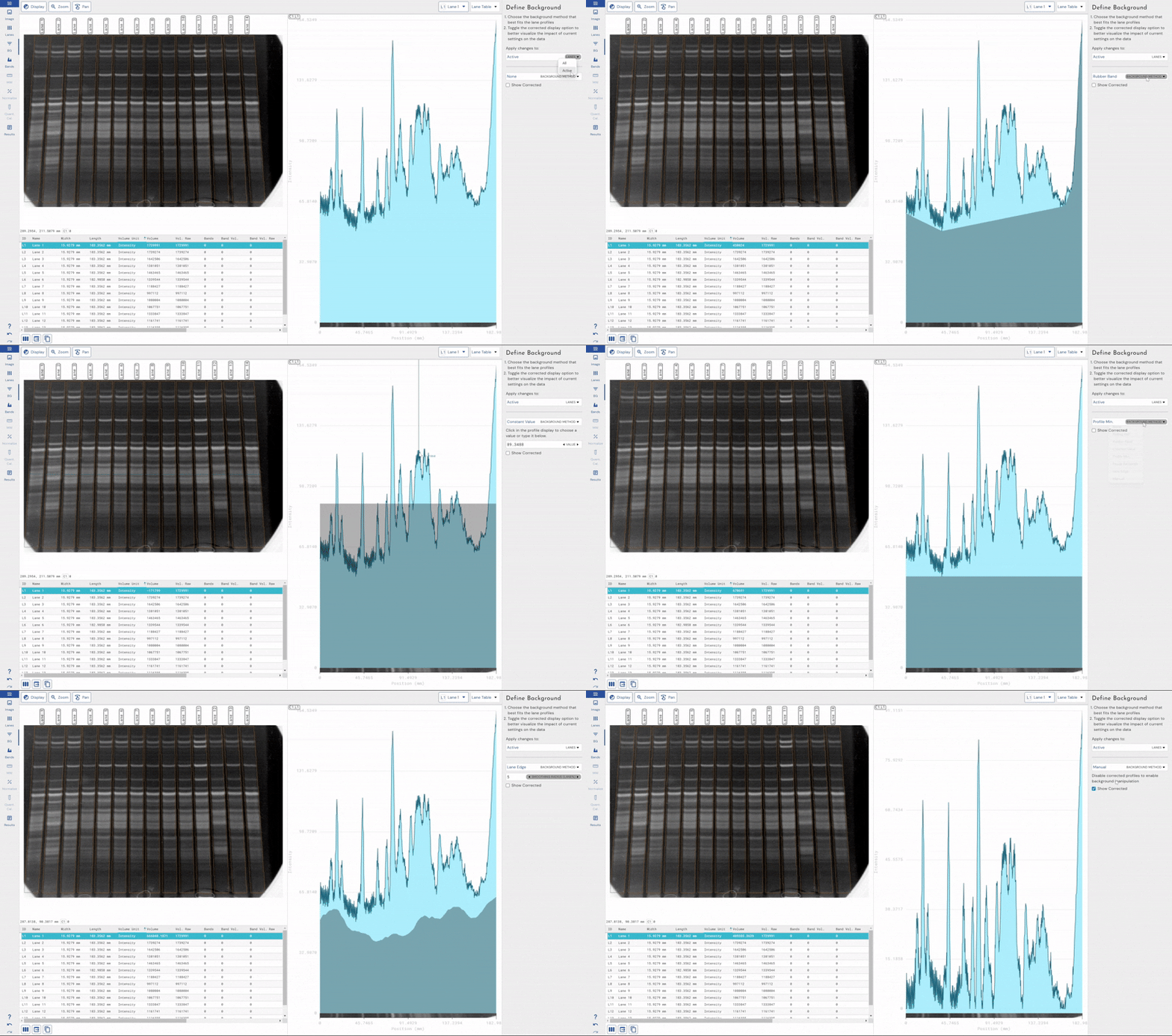
There are different methods of background removal depending on the software used for analysis, within our Phoretix 1D software we offer our users several different background subtraction techniques to choose from based on the image they’re currently wishing to analyze:
Some of the most common methods are:
Adaptive –
- Rolling Ball: Rolling ball background removal works by imagining a ball rolling under the surface of the image, where the height of the surface is determined by the pixel intensity. The top of the ball represents the background intensity at each pixel, and it is subtracted from the original image to ensure users are only measuring the intensity of each sample. Rolling ball can be effective for subtracting background from images that have smooth and continuous backgrounds. However, it is difficult to accurately subtract background using the rolling ball technique for lanes and images that have closely-spaced shapes or shapes with widely variable sizes. In our Phoretix 1D software, the size of the ball is represented as a percentage of the lane length, which is vastly superior when dealing with high-resolution images with long lanes over the older method of using a ball radius dictated by a fixed number of pixels.
- Lane Edge: This method is specific for lane-based images, such as western blots or DNA gels. It uses the lower of the two values at the edges of the lane length, as the background. If the section of the image used is wider than the bands, then this is a very effective way of removing co-migrating material from your measurements. This method should only be used if the bands are completely enclosed, because when the edges of your lane area intersect any of your bands, band material will be considered as background, severely affecting your results. This method of background removal is especially useful for images with multiple bands very close together.
- Rubber Band: This method can be thought of as stretching a rubber band underneath the lane profile and using the pixel value below that band as the background value at that point. If the values at the ends of the profile are lower than the rest of the profile or the bands are badly separated, do not use this method.
User-Defined –
- None: No background removal at all.
- Constant: This method allows the user to select a pixel intensity from their lane or manually type in a pixel intensity value to represent the background. This value is then subtracted from every pixel within the entire image. This method is suitable for images with a constant background value, which is rare.
- Image Rectangle: This method allows the user to draw a rectangular area of interest within their image (for example, an unused lane within a gel or blot image) and use the average pixel intensity within that area as a constant background value, just as in the constant background removal step above.
- Profile Minimum: This method sets the background level to the lowest value found in the profile as a constant value across the lane. It is not advisable to use this method where the lowest point is found at the extremities of the lane since the result is dependent on where the lane is drawn. This calculation can be hard to repeat between analyses.
Background removal is a crucial step for obtaining reliable and reproducible results when performing gel and Western blot quantification. By removing the unwanted signal from the image, background removal can also reduce variability and noise within your data, improving your confidence in your analysis and generating more reliable data.
Step-by-Step: How to Remove Background in Phoretix 1D
1. Import your gel image
2. Define lanes and bands using the intuitive lane detection tool.
3. Select a background subtraction method and whether you want to apply it to just the current (active) lane or all lanes:
- For most gels, start with the rolling ball algorithm.
- Adjust your parameters (e.g., ball size, constant value) for optimal fit
4. Preview results – ensure the baseline follows the true background and doesn’t start eating into your bands.
5. Quantify bands – Phoretix 1D automatically calculates the corrected intensities (but can also show you raw values for you to check independently).
Tip: Compare different methods side-by-side to select the most accurate for your gel.
Adaptive Background Removal and Noise Correction Algorithms
At TotalLab, we prioritize scientific transparency; our background detection algorithms are openly available for your understanding, ensuring you know how your data is processed – crucial for validated workflows in 21 CFR Part 11/GMP regulated industries.
Phoretix 1D software offers advanced, user-friendly, and adaptable background removal techniques. Recognizing the variability across numerous gel imaging devices, it allows real-time visualization of how different background removal methods and settings affect your data, enabling quick fine-tuning.
Uniquely, Phoretix 1D supports selecting different background removal techniques and settings per lane—vital for analyzing lanes with varying background levels—and per channel in multichannel images. This feature compensates for differing background levels between antibodies or stains on the same gel or blot, facilitating accurate quantification and total protein normalization.
Additionally, Phoretix 1D includes innovative noise-reduction techniques to smooth intensity signals, resulting in cleaner data for analysis.
Ready to improve your gel quantification?
Try Phoretix 1D for free or book a demo with our scientific support team.