
GMP Compliant Software: What It Means and How to Check for It
“GMP compliant software” is one of the most searched phrases in laboratory IT and one of the least precisely used. There is no certificate for it. No regulator approves software as GMP compliant, and a vendor’s claim on a datasheet carries no weight in an inspection. What the phrase should mean is that a piece of software provides the technical controls that let a regulated laboratory or manufacturer meet its own obligations under Good Manufacturing Practice: controlled access, complete and tamper-evident records, electronic signatures that mean something, validation evidence, and a supplier who will stand behind it. This article explains where those obligations come from, what they translate to in software terms, how to tell whether a product actually meets them, and what to do when the software you already depend on does not.
What “GMP compliant” means for software
Good Manufacturing Practice regulates the manufacturer, not the software. In the United States the requirements sit in 21 CFR Parts 210 and 211 for drugs, Part 820 for devices and Part 600 for biologics; in the European Union they sit in EudraLex Volume 4. None of those texts says what a piece of software must contain. What they require is that records be accurate, complete and attributable, that processes be controlled and that computerized systems be validated for their intended use. The software-specific rules are in two places: 21 CFR Part 11, which governs electronic records and electronic signatures for FDA-regulated activities, and EU GMP Annex 11, which governs computerized systems used in GMP activities.
So “GMP compliant software” is shorthand for software that gives a regulated user the technical controls those two texts require, together with the documentation needed to validate it. The compliance itself belongs to the user’s quality system. The software either makes that achievable or it does not.
This distinction matters commercially. A regulated lab that buys software without those controls has to build them procedurally, with paper logs, restricted rooms and standard operating procedures around a tool that cannot enforce anything, and inspectors increasingly expect system-enforced controls rather than paperwork around a gap. Our article on validated proteomics software describes what that looks like when a QC group tries to run free research tools in a GMP environment.
Where the requirements come from
21 CFR Part 11 applies to records that are created, modified, maintained, archived, retrieved or transmitted electronically under any FDA records requirement, and to electronic signatures on those records. Its core is section 11.10, which lists the controls a closed system must have: validation, the ability to generate accurate and complete copies, record protection, limited access, audit trails, operational and authority checks, and more. Subpart C covers electronic signatures: each must be unique to one individual, must use at least two distinct identification components such as an identification code and a password, and must be linked to its record so that it cannot be removed or transferred. FDA’s 2003 guidance on the scope and application of Part 11 narrowed the interpretation and said the agency would exercise enforcement discretion in several areas, but the controls in 11.10 remain the benchmark that vendors and buyers use.
EU Annex 11 is broader in scope. It covers the whole computerized system across its lifecycle: risk management, personnel, suppliers and service providers, validation, data, accuracy checks, data storage, printouts, audit trails, change and configuration management, periodic evaluation, security, incident management, electronic signatures, batch release, business continuity and archiving. The current version dates from 2011. A revised draft was published for consultation in July 2025, alongside a revised Chapter 4 on documentation and a new Annex 22 on artificial intelligence; the consultation closed on 7 October 2025 and final publication is expected from 2026. The draft expands audit trail review, IT security, periodic review, supplier management and archiving, so software built to the current text will have to be checked against the new one when it lands. Our comparison of Annex 11 and Part 11 goes through the two texts side by side.
Comparison of Annex 11 and Part 11
Behind both sit the data integrity expectations that inspectors actually apply: the ALCOA+ principles (attributable, legible, contemporaneous, original, accurate, plus complete, consistent, enduring and available), set out in MHRA and PIC/S guidance. Our ALCOA principles page explains each one.
The nine controls GMP compliant software must provide
Put the regulatory texts together and nine technical controls fall out. Software that lacks any of them cannot fairly be called GMP compliant, whatever the brochure says.
| Control | What the software must do | Where it comes from |
|---|---|---|
| Unique user accounts and access control | Every user has an individual login; access to functions and data is limited to authorized individuals; roles can be assigned and reviewed | Part 11 §11.10(d) and (g); Annex 11 §12 |
| Audit trail | Secure, computer-generated, time-stamped record of who created, changed or deleted what and when, that the operator cannot switch off or edit, kept as long as the record | Part 11 §11.10(e); Annex 11 §9 |
| Electronic signatures | Signature shows the signer's name, date and time and the meaning of the signing; uses two distinct identification components; is permanently linked to the record | Part 11 §11.50, §11.70, §11.100, §11.200; Annex 11 §14 |
| Record protection and retention | Records cannot be altered or deleted without trace, are backed up and can be retrieved throughout the retention period | Part 11 §11.10(c); Annex 11 §7 and §17 |
| Accurate and complete copies | The system can produce human-readable and electronic copies of records, including their audit trail, for inspection | Part 11 §11.10(b); Annex 11 §8 |
| Data accuracy and input checks | Built-in checks on critical data entered manually or transferred from other systems | Annex 11 §6 |
| Operational and authority checks | Enforced sequence of steps where required; the system checks that the person performing an action is allowed to | Part 11 §11.10(f) and (g) |
| Validation evidence | Documented evidence that the software does what it is intended to do, with a supplier who can support installation, operational and performance qualification | Part 11 §11.10(a); Annex 11 §4 |
| Change control and supplier support | Changes are controlled and documented; the supplier is assessed and provides documentation on request; incidents and updates are managed | Annex 11 §3, §10 and §13 |
Two of these deserve a closer look because they are the ones vendors most often get wrong.
The audit trail
An audit trail that can be disabled by an administrator, that records only that “a change was made”, that overwrites earlier entries, or that lives in a text file on the same disk as the data, does not meet §11.10(e). The regulation asks for a secure, computer-generated, time-stamped record that independently documents operator entries and actions and that is retained for at least as long as the record it belongs to. In practice that means the audit trail is written by the system, not the user; it records the old value, the new value, who made the change and when, and where required why; it cannot be turned off; and it can be reviewed. The draft Annex 11 goes further and specifies review of audit trails in detail. If a vendor cannot show you the audit trail for a record on screen, and export it, assume it does not meet the standard.
Electronic signatures
An electronic signature is not a typed name in a comment box. Under Part 11 it must be unique to one individual, must consist of at least two distinct identification components (typically a user ID and a password) when the signer is not using biometrics, must show the signer’s printed name, the date and time and the meaning of the signature (review, approval, authorship), and must be linked to the record so that it cannot be copied, excised or transferred to another record. The system also has to enforce the first signing in a session using both components. Software that meets this looks like a dialog that asks for credentials at the moment of signing and then stamps the record with name, time and meaning; anything less is a workflow step, not a signature.
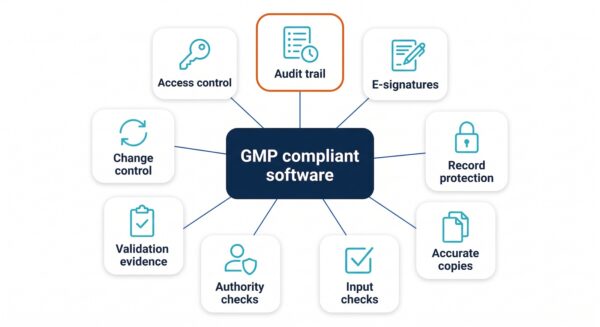
No regulator certifies software as GMP compliant. What the phrase should mean is that all nine of these controls are present and cannot be bypassed.
Compliant, compliance-ready and validated: three different claims
Vendors use three phrases that buyers often treat as interchangeable.
“GMP compliant” or “21 CFR Part 11 compliant” should mean the software provides the nine controls above. Strictly, only a user can be compliant, so the honest form of the claim is that the software supports compliance, or provides the technical controls Part 11 and Annex 11 require.
“Compliance-ready” or “compliance-capable” usually means that some of the controls exist, or that they exist but are optional, or that they can be added. It is a phrase to interrogate. Ask which specific controls are present, whether the audit trail can be disabled, and whether electronic signatures meet §11.200.
“Validated” is a claim about your installation, not about the product. The vendor can and should supply validation documentation, test evidence from its own development lifecycle, and installation and operational qualification protocols, but the performance qualification, against your intended use, is yours. A vendor who says the product “is validated” so that you need do nothing is describing a situation Annex 11 does not recognize.
| Claim on the datasheet | What it usually means | What to ask for |
|---|---|---|
| "GMP compliant" / "21 CFR Part 11 compliant" | The technical controls are present and cannot be bypassed | A control-by-control mapping to §11.10, §11.50 to §11.300 and Annex 11; a live demonstration of the audit trail and signatures |
| "Compliance-ready" / "compliance-capable" | Some controls exist, are optional, or require a module or a partner | The list of controls that are missing or optional; whether audit trail and signatures can be turned off |
| "Validated" | The vendor has tested its own product | Validation package: requirements, test evidence, IQ/OQ protocols, release notes; a named contact for audit support |
| "Audit trail" | Anything from a full change history to a log file | A screen showing old value, new value, user, timestamp and reason; export of the trail; confirmation it cannot be disabled |
| "Electronic signatures" | Anything from Part 11 signatures to a typed name | A signing dialog that requires credentials and stamps name, time and meaning on the record |
| "Secure" | Undefined | Access model, password policy, Active Directory or single sign-on support, encryption at rest and in transit |
How to check a vendor’s claim
The fastest test is to ask the vendor to show you, not tell you. Sit in front of the software with a QA colleague and work through this list. A good vendor will welcome it, because it is exactly what an inspector will do.
- Log in as two different users with different roles. Try to perform an action the second role should not be allowed to. It should be refused and the refusal should be logged.
- Change a result or a setting, then open the audit trail for that record. You should see the previous value, the new value, the user, the date and time and, where the system requires it, the reason.
- Ask the administrator to switch the audit trail off. It should not be possible.
- Sign a record electronically. The dialog should require the user’s credentials; the signed record should display the signer’s name, the time and the meaning of the signature; and the signature should still be there if the record is exported.
- Try to sign as another user without re-entering credentials in the same session. The first signing must require both identification components.
- Export a record with its audit trail in a human-readable form. Check that it is complete.
- Ask for the validation package and read the table of contents. It should include requirements, design or functional specifications, test evidence, IQ and OQ protocols and a change history.
- Ask who supports an inspection. A named person, a response time and a description of what they will supply.
- Ask how the software handles the loss of a connection or a crash in the middle of a signed workflow. Records should be recoverable and the interruption logged.
- Ask about time synchronization. Timestamps should come from a trusted clock, not the user’s machine, or the system should record both.
A vendor who cannot do the first six on the spot has software that is compliance-ready at best.
Making existing software compliant
Most laboratories do not have the luxury of choosing new software. They have an instrument whose control software works but has no audit trail, an analysis package the science depends on, or a spreadsheet-based workflow that everyone knows is a finding waiting to happen. Our article on the risk of Excel macros in GMP describes the last case in detail.
There are three routes. The first is procedural: restrict the software to a locked room and a named user, keep paper logs, and sign printouts. It is cheap to start and expensive to sustain, because the SOPs multiply, the same finding keeps coming back, and none of it is system-enforced. The second is replacement: buy or build a compliant alternative and migrate. It is the right answer when the software is also scientifically obsolete, and the wrong one when the science is fine and only the compliance layer is missing. The third is to add the compliance layer to the existing software.
The third route is what TotalLab’s AuditSafe does. AuditSafe is a 21 CFR Part 11 and Annex 11 layer that provides audit trails, electronic signatures, granular user permissions and image authenticity verification around software that lacks them. It was built for TotalLab’s own analysis products and is now integrated by instrument manufacturers into their own software; World Precision Instruments used it to bring 21 CFR Part 11 compliance to their EVOM Auto product line. For a laboratory the route is the AuditSafe overlay; for a manufacturer it is OEM integration.
Custom software and GMP
When no product does what a regulated workflow needs, the software has to be built, and GMP then applies to the build. Custom software is GAMP category 5, which carries the fullest lifecycle expectations: documented requirements, design, code review, version control, verification against the requirements, and a supplier who can be assessed. Under Annex 11 the regulated user remains responsible for the validation, but the supplier’s development evidence is what makes that validation possible, and a supplier who has never been through a pharmaceutical audit will not know what to produce.
TotalLab builds custom software for regulated laboratories and manufacturers with the compliance layer designed in from the first specification rather than added after the science is finished: requirements and risk assessment at scoping, audit trails and signatures as standard components, validation documentation delivered with the software, and support through customer audits. Our article on validating custom software explains what documentation you should expect from a developer, and our custom development page describes the engagement from discovery call to supported software.
Frequently asked questions
What is GMP compliant software?
Software that provides the technical controls a regulated user needs to meet Good Manufacturing Practice requirements for electronic records and computerized systems: unique user access, a secure audit trail, Part 11 electronic signatures, record protection and retention, accurate copies, input checks, validation evidence and controlled change. No regulator certifies software as GMP compliant; the user’s quality system is what is compliant, and the software has to make that possible.
Is there a GMP certification for software?
No. Neither the FDA nor EU regulators certify software. Vendors can supply a mapping of their controls to 21 CFR Part 11 and Annex 11, validation documentation and audit support, and that is what buyers should ask for.
What is the difference between GMP compliant and 21 CFR Part 11 compliant software?
21 CFR Part 11 is the FDA regulation on electronic records and signatures; it is one of the requirements a GMP-regulated user has to meet. Software described as Part 11 compliant provides the record and signature controls. GMP compliance in the EU also brings in Annex 11, which covers the whole computerized system lifecycle. In practice buyers want both.
Does GMP compliant software need an audit trail?
Yes. 21 CFR Part 11 §11.10(e) requires secure, computer-generated, time-stamped audit trails that record operator entries and actions and cannot be altered, and Annex 11 §9 requires them for GMP-relevant changes and deletions. An audit trail that can be disabled does not meet either.
What is a 21 CFR Part 11 electronic signature?
A signature unique to one individual, made with at least two distinct identification components such as a user ID and password, that shows the signer’s name, the date and time and the meaning of the signature, and that is permanently linked to the signed record.
Can existing lab software be made GMP compliant?
Often, yes. A compliance layer such as AuditSafe adds audit trails, electronic signatures, user permissions and authenticity checks around software that lacks them, which avoids replacing software the science depends on.
Is validated software the same as compliant software?
No. Compliance describes the controls the software provides. Validation is the documented evidence that a specific installation does what it is intended to do, and it belongs to the user, supported by the vendor’s documentation.
What software is used for GMP compliance?
Categories include quality management, document control, LIMS and ELN, manufacturing execution, instrument control and data analysis software. Whatever the category, the test is the same set of controls: access, audit trail, signatures, record protection, copies, checks, validation evidence and change control.
References
1. U.S. Food and Drug Administration. 21 CFR Part 11, Electronic Records; Electronic Signatures. eCFR, current as of September 2026. https://www.ecfr.gov/current/title-21/chapter-I/subchapter-A/part-11
(Source for: §11.3 definitions; §11.10 controls for closed systems including (a) validation, (b) copies, (c) record protection, (d) limited access, (e) audit trails, (f) operational checks, (g) authority checks; §11.50 signature manifestations; §11.70 signature/record linking; §11.100 general requirements; §11.200 signature components; §11.300 controls for identification codes and passwords.)
2. U.S. Food and Drug Administration. Guidance for Industry: Part 11, Electronic Records; Electronic Signatures, Scope and Application. August 2003. https://www.fda.gov/regulatory-information/search-fda-guidance-documents/part-11-electronic-records-electronic-signatures-scope-and-application
(Source for: the narrowed interpretation of Part 11 and enforcement discretion.)
3. European Commission. EudraLex Volume 4, Annex 11: Computerised Systems. 2011. https://health.ec.europa.eu/medicinal-products/eudralex/eudralex-volume-4_en
(Source for: the scope and section structure of Annex 11, including §3 suppliers, §4 validation, §6 accuracy checks, §7 data storage, §8 printouts, §9 audit trails, §10 change management, §12 security, §13 incident management, §14 electronic signature, §17 archiving.)
4. European Commission. Stakeholders consultation: EudraLex Volume 4, Chapter 4, Annex 11 and new Annex 22. Consultation open 7 July 2025 to 7 October 2025. https://health.ec.europa.eu/consultations/stakeholders-consultation-eudralex-volume-4-good-manufacturing-practice-guidelines-chapter-4-annex_en
(Source for: the revised draft Annex 11, revised Chapter 4 and new Annex 22 on AI, and the consultation dates.)
5. ECA Academy. Annex 11 Draft: First Analysis. 2025. https://www.gmp-compliance.org/gmp-news/annex-11-draft-first-analysis
(Source for: the draft’s expanded sections on audit trail review, IT security, periodic review, supplier management and archiving, and final publication expected from 2026.)
6. MHRA. ‘GXP’ Data Integrity Guidance and Definitions. March 2018. https://www.gov.uk/government/publications/guidance-on-gxp-data-integrity
(Source for: ALCOA+ principles.)
7. PIC/S. Good Practices for Data Management and Integrity in Regulated GMP/GDP Environments, PI 041-1. July 2021. https://picscheme.org/en/publications
(Source for: inspector expectations on data integrity and system-enforced controls.)
8. TotalLab. 21 CFR Part 11 and GMP Compliance for Instrument Makers, AuditSafe. https://totallab.com/21cfr-software-development/
(Source for: AuditSafe capabilities and the World Precision Instruments EVOM Auto case.)
Need software that will pass the audit?
Whether you need a compliance layer added to software you already run, a compliant edition of the instrument software you sell, or a new tool built for a regulated workflow, TotalLab has done it for laboratories and manufacturers that sell into the largest pharmaceutical companies. Book a free 30-minute discovery call and we will tell you which route fits.
Book a free 30-minute discovery call