Custom vs Off-the-Shelf Scientific Software: How to Decide

Every laboratory reaches the point where the software it has does not do what the science needs. The instrument’s own package stops at the export button. The analysis tool cannot handle the new assay. The workflow that connects them lives in a spreadsheet and three people’s heads. At that point there are three ways forward: buy a product that does most of it, configure a platform until it does, or build the tool the work actually needs. Getting the choice right is worth years; getting it wrong is how labs end up running validated workarounds around software they have outgrown. This article gives a decision framework for scientific and laboratory software specifically, where the hard part is usually the analysis rather than the database, explains the costs that do not appear on the quote, and sets out what a custom build actually involves and costs.
The three options, and why scientific software is different
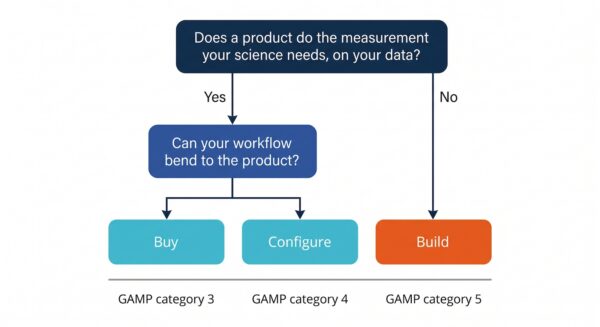
rcial analysis package, a LIMS used with its default workflows. In GAMP 5 terms this is category 3, non-configured software, and it carries the lightest validation load.
Configure means a commercial platform adapted through its own settings, templates and business rules without changing its code: most LIMS and ELN deployments, workflow engines, quality management systems. This is GAMP category 4, and the validation effort follows the configuration.
Build means software written for the purpose, whether by an in-house team or a development partner. This is GAMP category 5, custom applications, with the fullest lifecycle expectations: documented requirements, design evidence, reviews, version control and verification, scaled to risk.
Most build-versus-buy advice is written for business software, where the question is whether a commercial system’s data model and workflows fit the organization. Scientific software adds a second question that usually decides the matter: does the product implement the measurement, algorithm or analysis the science depends on, correctly, for your data? A LIMS can be configured to hold any sample type. It cannot be configured to align a 2D gel, quantify a colony plate, fit a kinetic curve to your assay or run the statistics your submission needs. When the gap is in the analysis rather than the data model, configuration does not close it, and the choice is between a product that happens to do the analysis and a build.
Signs you should buy off the shelf
Buy when a product exists that does the analysis your work needs, on your data formats, to a standard you can validate, and when your workflow can bend to the product rather than the other way around. The signs are familiar. The technique is established and the software category is mature: 1D and 2D gel analysis, Western blot quantification, ELISA, colony counting, plate reading. Several vendors sell into your sector and can show you customers like you. The product has a validation package and audit support if you are regulated. The features you would want added are on the vendor’s roadmap or are not important enough to wait for. And the total cost, license plus validation plus training, is a fraction of a build.
Buying also has a cost that is easy to forget: the product will change on the vendor’s schedule, not yours, and every upgrade of a validated system is a validation activity. Choose a vendor whose release cadence and support model you can live with. Our software selection guide covers how to compare products in TotalLab’s own categories.
Signs a configurable platform fits
Configure when the problem is organizing, tracking and reporting rather than measuring: sample management, batch records, document control, training records, inventory, scheduling. The signs are that your workflow is a variation on a standard one, that the data model is the platform’s data model with different labels, that the vendor’s own services team or a partner has configured the platform for labs like yours before, and that the integrations you need (instruments, ERP, ELN) are supported.
Configuration has a trap of its own. Every platform has a point beyond which configuration becomes customization: scripts, plug-ins, custom modules, “professional services” that write code inside the product. Past that point you have a category 5 system with a category 4 price tag and a vendor who owns the runtime. If the configuration plan includes custom code, treat that code as a build and ask the same questions you would ask a developer.
Signs you should build
Build when the analysis or workflow is specific to your science, your instrument or your product, and no product does it well enough. The signs are clear in retrospect and worth recognizing in advance.
The measurement is yours. You have an assay, an imaging method or an instrument whose output no commercial package interprets, or interprets with an algorithm you cannot inspect or validate.
The workflow is the product. A manual process of acquisition, analysis, annotation and reporting that skilled people currently perform step by step, with the errors and delays that implies, and that automation would turn into minutes. TotalLab’s biotech automated analysis project, which took a slow manual 1D SDS-PAGE gel analysis and reporting process to results in seconds, is this case.
You are an instrument manufacturer. Your hardware needs control, acquisition and analysis software that carries your brand, and the alternatives are a generic package that undersells the instrument or an in-house software team you do not want to build. Our OEM instrument software article covers this route.
OEM instrument software article
Compliance is blocking the sale or the process. The software the science depends on has no audit trail or electronic signatures, and the choice is between procedural workarounds, replacement, or adding a compliance layer, which is a build of a specific kind. Our article on GMP compliant software explains the options.
The commercial product is being forced. You are paying for a platform and using a tenth of it, maintaining scripts around it, and exporting to spreadsheets to do the part that matters.
| Question | Buy | Configure | Build |
|---|---|---|---|
| Does a product implement the analysis you need, correctly, on your data? | Yes | Not the analysis; the data around it | No product does |
| How much must the workflow bend to the software? | A lot | Some | Not at all |
| Where does the value sit? | In a standard measurement | In organizing and tracking | In a measurement, algorithm or automation of your own |
| GAMP category and validation load | 3: lightest | 4: follows the configuration | 5: fullest, scaled to risk |
| Who controls the roadmap? | The vendor | The vendor, within your configuration | You |
| Time to first use | Days to weeks | Weeks to months | Months |
| Typical cost profile | License plus validation | License plus services plus validation | Development plus validation, then support |
| Best when | The category is mature and vendors sell to labs like yours | The problem is tracking and reporting | The problem is the science, the instrument or the product |
The hidden cost of forcing a fit
The commonest mistake is not choosing the wrong option; it is choosing buy or configure for a build problem because the quote is smaller, and then paying the difference in slow motion. The costs are real even when no invoice carries them.
Analyst time. Every step the software does not do is done by a person, every day, for the life of the process. A workflow that takes a scientist two hours per run instead of ten minutes costs the difference multiplied by runs per year multiplied by years, and that number is usually larger than a build.
Validated workarounds. In a regulated environment, every gap in the software becomes a procedure: a spreadsheet with its own validation, a paper log, a second-person check. Each is a document to maintain, a training record to keep and a finding waiting to happen.
Vendor dependence. Scripts and plug-ins written inside a platform are tied to its version. When the vendor upgrades, the scripts break; when the vendor is acquired or discontinues the product, the scripts die with it. TotalLab has taken on the users of two 2D gel packages that are no longer developed, PDQuest and DeCyder, for exactly this reason.
Lost science. The analysis that a generic tool cannot do is often the analysis that would have made the difference: the isoform the package merges, the plate the counter misreads, the trend the report cannot show.
The right comparison is therefore not license versus build cost but total cost over the years the software will run, which is the subject of the five-year view below.
What a custom build involves
A custom scientific software project follows a recognizable path, and understanding it makes it much easier to judge a proposal.
Discovery and scoping. The developer learns the science, the instrument and the workflow, identifies the measurement that matters and the risks, and produces a scope, a plan and a fixed view of what will be built. For a regulated build this stage also produces the user requirements specification and the initial risk assessment that validation will rest on.
Design. Architecture, data model, algorithm selection and user interface. For analysis software the design stage is where the algorithm is chosen or developed and its performance on your real data is established, because an analysis that works on the vendor’s test images and not on yours is worthless.
Build. Iterative development against working software rather than documents, with the lab reviewing real outputs at each iteration. GAMP 5 second edition explicitly supports agile methods for regulated software provided the lifecycle controls are kept, and a partner who works this way will show you working software within weeks, not at the end.
Verification and validation. Testing against the requirements, with documented evidence; for regulated software, installation and operational qualification protocols, and support for your performance qualification. The FDA’s 2025 guidance on computer software assurance, and GAMP 5 second edition, both push this toward risk-based, critical-thinking assurance rather than a fixed volume of paperwork, which reduces cost without reducing rigor. Our validation article explains what documents you should receive.
Deployment, training and support. Installation, user training, and a support agreement that covers defects, operating system changes, and enhancement. Scientific software runs for a decade or more; the support arrangement matters more than the build price.
What a custom build costs
Anyone who quotes a price for custom scientific software before understanding the science is guessing. What can be said with confidence is what drives the cost, and how much each driver moves it.
| Cost driver | Moves the cost | Why |
|---|---|---|
| Novelty of the analysis | Most | An established algorithm applied to new data is engineering; a new algorithm is research, with the uncertainty that implies |
| Number of instruments, data formats and integrations | A lot | Each format and each system to connect is a specification, an implementation and a test |
| Regulatory scope (21 CFR Part 11, Annex 11, GMP) | A lot | Audit trails, signatures, access control and validation documentation are real components; they add less when designed in from the start than when bolted on |
| Number of user roles and workflows | Moderately | Each role is a set of permissions and screens; each workflow is a sequence to design, build and validate |
| User interface expectations | Moderately | A tool for three specialists and a product for a thousand customers are different jobs |
| Reporting and export requirements | Moderately | Report templates, formats and signatures multiply the test effort |
| Data volume and performance | Depends | Most lab tools are small; imaging and high-throughput data are not |
| Platform and deployment | Depends | Windows desktop, server, cloud, embedded and instrument-attached each have their own constraints |
| Support and maintenance term | Ongoing | Ten years of operating system updates, security patches and enhancements is the larger part of lifetime cost |
The pattern is that the science and the compliance drive the cost, and that both are cheaper when the developer already understands them. A generalist agency prices in the time to learn what an assay is; a scientific developer prices in the time to build it.
Total cost of ownership: a five-year view
Compare options over the period the software will actually run, and include the people. The table gives the categories; fill in your own numbers.
| Cost over five years | Buy | Configure | Build |
|---|---|---|---|
| Licenses and subscriptions | Annual per seat or site | Annual platform fee, often per user | A license or support fee, set by contract |
| Implementation | Installation and training | Configuration services, often the largest line | Development, the largest line |
| Validation | Vendor package plus your PQ | Configuration testing plus your PQ | Full lifecycle, supplied with the software, plus your PQ |
| Analyst time on manual steps | Whatever the product does not do, every run | Whatever the configuration does not cover | Designed out |
| Workarounds and their maintenance | Spreadsheets, logs, SOPs | Scripts and plug-ins tied to the platform version | None by design |
| Upgrades | Vendor cadence; each is a validation activity | Vendor cadence plus re-testing configuration | Your cadence |
| Exit cost | Data export in vendor formats | Often high: schema and scripts are proprietary | Set by the development contract |
| Support | Vendor contract | Vendor plus integrator | Developer contract |
Filling this in with real numbers usually shows two things: that buy wins comfortably when a product does the job, and that build wins when the analyst-time and workaround rows are large, which is exactly the situation in which labs most often choose to buy anyway because the license looks cheaper.
How TotalLab approaches custom builds
TotalLab has built and sold its own analytical software for more than 35 years, and builds custom and white-label software with the same team. The work spans instrument software for imaging hardware (AzureSpot Pro for Azure Biosystems, followed by a 21 CFR Part 11 and GMP-compliant edition), automated gel analysis and reporting for a biotech, a 21 CFR Part 11-compliant database for an immunotherapy developer, and an automated GMP-compliant ATMP workflow for a global pharmaceutical manufacturer. Every project starts with a free 30-minute discovery call, moves to a scoped proposal with a fixed view of what will be built, is built in the open with working software at each iteration, is validated to whatever standard the work demands, and is supported afterward. The case studies page shows what that has produced.
Frequently asked questions
When should a lab build custom software instead of buying it?
When the value is in a measurement, algorithm or automation that no product implements well enough on your data, when the workflow cannot bend to a product, when you are an instrument manufacturer who needs software under your own brand, or when a compliance gap in essential software cannot be closed any other way.
Is custom software more expensive than off-the-shelf?
The build price is higher than a license. Over the life of the software the comparison depends on how much analyst time and how many workarounds the product would require; when those are large, custom is cheaper. Compare over five years and include the people.
How long does a custom scientific software project take?
Months rather than weeks for a tool of any substance, with working software visible within the first few weeks of an iterative build. Regulated projects add validation time. A scoped proposal after discovery gives a timeline for your project.
What is the difference between configuring and customizing software?
Configuration changes settings, templates and rules within a product without changing its code (GAMP category 4). Customization adds code, scripts or modules (GAMP category 5) and should be treated as a build for validation and risk purposes.
What is GAMP category 5 software?
Custom applications: software developed for a specific purpose, including in-house code and materially modified open-source software. It carries the fullest lifecycle expectations, scaled to the software’s risk and complexity.
Can custom software be 21 CFR Part 11 compliant?
Yes, and it is easier when the compliance controls (audit trail, electronic signatures, access control, record protection) are designed in from the specification rather than added afterward. The developer should deliver validation documentation with the software.
Who owns custom software once it is built?
That is defined in the contract and can be negotiated. TotalLab are extremely flexible when it comes to pricing, pricing models, methods of ownership and support etc. and already have lost of different projects all with unique payment and ownership terms.
Why choose a scientific software developer over a general agency?
Because the cost and the risk of scientific software sit in the science and the compliance, and a developer who has built and validated analytical software before starts the project already knowing what the assay, the image or the instrument means.
References
1. ISPE. GAMP 5: A Risk-Based Approach to Compliant GxP Computerized Systems, Second Edition. July 2022. https://ispe.org/publications/guidance-documents/gamp-5-guide-2nd-edition
(Source for: software categories 1, 3, 4 and 5; lifecycle controls for custom components scaled to risk; support for agile methods and critical thinking.)
2. U.S. Food and Drug Administration. Computer Software Assurance for Production and Quality System Software: Guidance for Industry and FDA Staff. Published 24 September 2025. https://www.federalregister.gov/documents/2025/09/24/2025-18468/computer-software-assurance-for-production-and-quality-system-software-guidance-for-industry-and
(Source for: the risk-based approach to software assurance and the statement that testing alone is often insufficient.)
3. European Commission. EudraLex Volume 4, Annex 11: Computerised Systems. 2011. https://health.ec.europa.eu/medicinal-products/eudralex/eudralex-volume-4_en
(Source for: the regulated user’s responsibility for validation and the supplier’s role.)
4. TotalLab. Case studies: what we built, and what changed. https://totallab.com/case-studies/
(Source for: the Azure Biosystems, biotech automation, immunotherapy database and ATMP workflow projects.)
5. TotalLab. Custom life science software development. https://totallab.com/custom-life-science-software-development/
(Source for: the engagement process from discovery call to support.)
Not sure which option fits? Ask someone who has built all three
TotalLab sells off-the-shelf analysis software, integrates compliance into other vendors’ products and builds custom tools, so a discovery call is an honest conversation about which route your problem needs, not a pitch for one of them. Thirty minutes, free, with a scientist who writes software.
Book a free 30-minute discovery call See what we've built for others