
GelAnalyzer vs Phoretix 1D: what the free gel analyzer does, and when to move on

GelAnalyzer is a free desktop program for analyzing 1D gel images. It detects lanes and bands, subtracts background, and calibrates molecular weight and quantity, and for a single agarose gel or a teaching lab it does that job well. This page sets out what the current version does, what its paid Plus tier adds, and where it stops: the points at which labs quantifying western blots for publication or for QC move to dedicated software such as Phoretix 1D.
All GelAnalyzer details below are taken from gelanalyzer.com and its 26.1.1 user guide, checked on 16 October 2026. GelAnalyzer is developed independently; TotalLab has no connection with it.
On this page
- GelAnalyzer and Phoretix 1D at a glance
- What GelAnalyzer is
- What GelAnalyzer does well
- The 8-bit limit, and why it matters for western blots
- Normalization: volume ratio is not a loading control
- Exports, reports and records
- Regulated labs and 21 CFR Part 11
- Which should you use?
- Switch from GelAnalyzer to Phoretix 1D
- Frequently asked questions

GelAnalyzer and Phoretix 1D at a glance
| Feature | GelAnalyzer 26.1.1 | Phoretix 1D |
|---|---|---|
| Price | Core program free. Plus tier €45, one-time | Paid license with a free trial. Multi-license and site-wide pricing available |
| License | Plus is licensed to an individual, not an organization | Licenses for individual users, labs and sites |
| Platforms | Windows; macOS (Apple silicon installer); Linux (.deb); Java package needing JDK 26+ | Windows, macOS and Linux |
| Image bit depth | 8-bit per channel only (profile maximum 255) | 8-bit and 16-bit |
| Image formats | JPG, GIF, PNG, TIFF | Uncompressed TIFF, JPEG, PNG, BMP, IMG; Bio-Rad .scn read natively |
| Multichannel and multiplex images | Not documented; one image per analysis | Yes, multichannel and multiplex images in one experiment |
| Lane detection | Automatic and manual; curved lanes by adding path points | Automatic and manual; curved lanes |
| Band detection | Automatic with adjustable parameters, plus manual edits | Automatic, plus manual and fixed-size manual bands |
| Background subtraction | 3 automatic methods (rolling ball, morphological, valley to valley) plus manual baseline | 8 methods: none, rolling ball, rubber band, constant value, profile minimum, image rectangle, lane edge, manual; set lane by lane |
| Normalization | Volume ratio: band volume as % of all bands in its lane | To a reference band, a housekeeping channel or total lane volume (total protein) |
| Rf calibration | Rf curves drawn across the image, interpolated between curves | Rf from lane length |
| Molecular weight calibration | Linear, quadratic, linear log or log fit; saved MW standard lists | Multiple curve types; built-in marker library and saved calibrations |
| Quantity calibration | Linear, quadratic, linear log or log fit | Yes, automated quantity calibration |
| Undo and redo | Plus only | Included |
| Data export | Free: images (PNG, JPG) and tables copied to the clipboard. Plus: full band table and lane profiles as text | CSV export |
| Report | None documented | PDF report of the analysis and its settings |
| Saved settings for many gels | Not documented | User-defined protocols |
| 21 CFR Part 11 and EU Annex 11 | No user accounts, audit trail or e-signatures documented | With AuditSafe: audit trails, electronic signatures, granular user permissions, image authenticity verification |
| How to cite | No published paper; cite name, version, website and authors | Phoretix 1D (TotalLab Ltd, Newcastle upon Tyne, UK) |
GelAnalyzer 26.1.1 and Phoretix 1D compared feature by feature. GelAnalyzer details from gelanalyzer.com and its user guide, checked 16 October 2026.
What GelAnalyzer is
GelAnalyzer is written by István Lázár Jr., PhD, with István Lázár Sr., PhD, CSc, as scientific advisor (ref 1). The current release is 26.1.1. It installs on Windows, on macOS (the native installer is for Apple silicon Macs; Intel Macs use the Java package) and on Linux as a Debian package, and there is a Java version for any system with JDK 26 or later (ref 1).
The core program is free. Since version 26.1 some features sit in a paid tier called Plus: undo and redo, lane and band labels and notes, export of the full band table and lane profiles as text, and export of a single lane’s image (refs 1, 2). A Plus license costs €45 as a one-time purchase that does not expire. It is an individual license in the buyer’s own name, “not an organizational license” (ref 3). To try Plus first you request a trial key by email and upload up to three images through a link; the trial key then works for those images only (ref 2).
Each GelAnalyzer analysis is built from a single gel image. You rotate and crop the image when you create the analysis, tell the program whether the bands are dark on light or light on dark, and save the analysis to a file with its lanes, bands, baselines and calibrations (ref 2).
What GelAnalyzer does well
GelAnalyzer earns its following. Lane and band detection are automatic with adjustable parameters, and every lane and band can be added, moved or deleted by hand. Lanes can be curved by adding points to their path. Background correction offers three automatic methods (rolling ball, a morphological top-hat method that behaves much like rolling ball, and valley to valley) plus manual editing of the baseline (ref 2).
Its Rf calibration is a strength. You draw horizontal Rf curves across the whole image and GelAnalyzer interpolates each band’s Rf between the curves above and below it, which corrects for lanes that ran unevenly (ref 2). Molecular weight and quantity calibration both fit a choice of four functions (linear, quadratic, linear log and log, the last an exponential fit), and molecular weight markers can be saved as standard lists and reloaded (ref 2). Version 26.1 also redesigned the interface with high-DPI scaling, which should address the screen-scaling problems we saw in earlier releases (ref 1).
For a teaching lab, a quick estimate of DNA fragment sizes on an agarose gel, or a lab that runs the occasional gel and has no software budget, GelAnalyzer is a reasonable choice. The rest of this page is about the work it was not built for.
The 8-bit limit, and why it matters for western blots
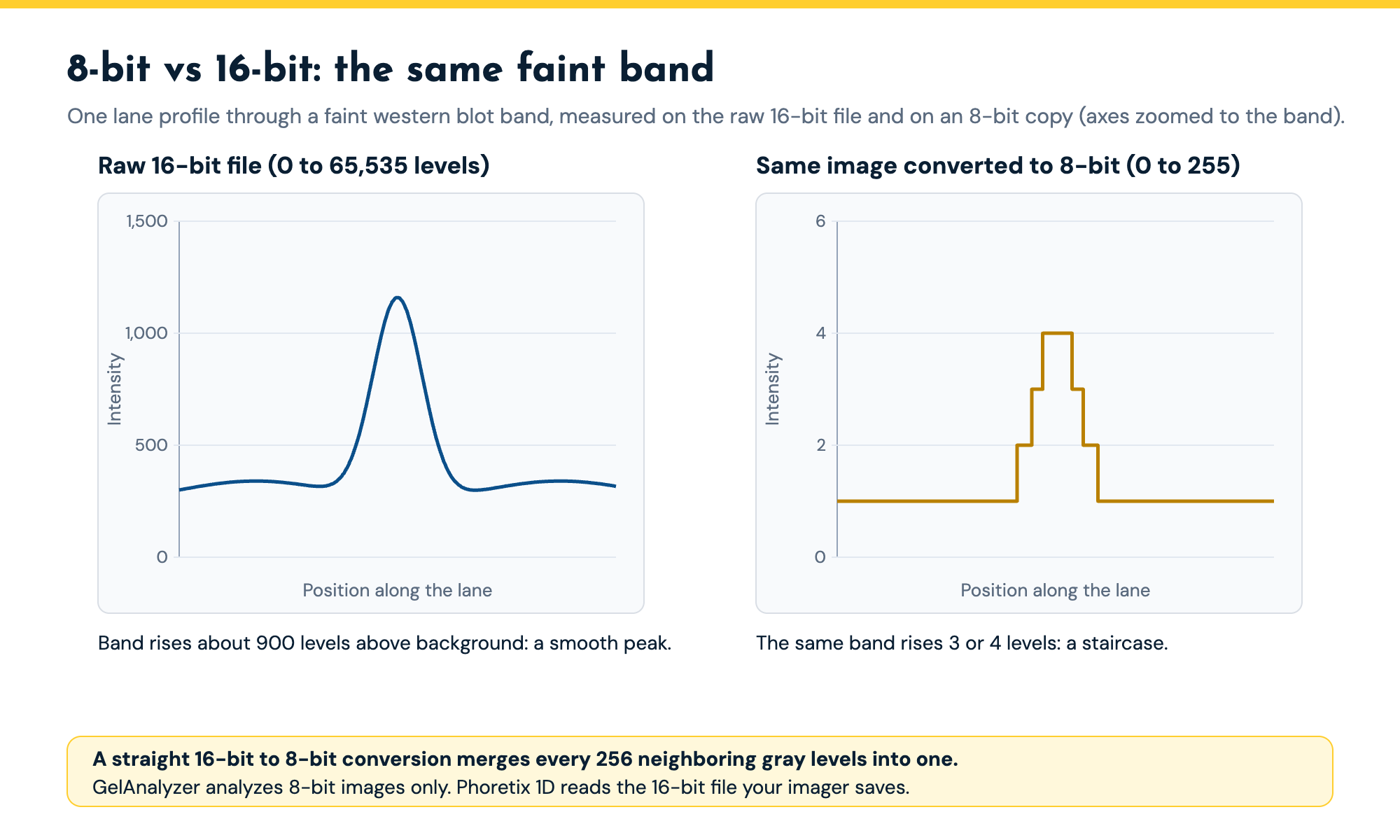
The GelAnalyzer user guide states that the program “currently only supports 8-bit/channel images, resulting in a maximal intensity value of 255 for a lane’s profile” (ref 2). Color images are converted to 8-bit grayscale.
That matters because the imagers used for quantitative western blots, both CCD and CMOS cameras for chemiluminescence and laser scanners for fluorescence, typically save 16-bit images with 65,536 gray levels. An 8-bit image has 256. A straight conversion of a 16-bit blot to 8-bit maps every 256 neighboring gray levels to one, so a faint band that spanned a few hundred levels in the raw file may span one or two after conversion, and differences between your weakest samples disappear into rounding. The conversion also hides saturation: once the scale is compressed you can no longer see whether the strongest band hit the detector’s ceiling. Precision suffers most at the faint end, where a band only a few levels above background carries a rounding error that is a large share of its signal. Journals increasingly ask for the raw image files behind a blot, so the file you quantify should be the one your imager saved (ref 4).
Phoretix 1D reads 8-bit and 16-bit uncompressed TIFF directly, as well as JPEG, PNG and BMP, and opens Bio-Rad .scn files natively, so the analysis starts from the raw data your imager recorded (ref 5). It can also display saturated pixels so you can check every band you intend to quantify. The western blot densitometry guide explains bit depth, saturation and the linear range in more detail.
Normalization: volume ratio is not a loading control
Journals and reviewers expect western blot results to be normalized, usually to a housekeeping protein such as beta-actin or GAPDH, or increasingly to total protein (ref 6). GelAnalyzer reports a band’s “volume ratio”: its raw volume as a percentage of the summed volume of all bands in the same lane (ref 2). That is a within-lane share, not normalization to a loading control, and the user guide describes no way to divide a target band by a housekeeping band or by a total protein stain. When we ran the same multichannel blot through both programs, GelAnalyzer had no option for multichannel or multipage TIFFs and no normalization tools (ref 7).
Phoretix 1D normalizes in three ways: to a reference band, to a housekeeping protein in a second channel, or to total lane volume, where a total protein stain in one channel is used to correct the target channel (ref 5). Multichannel and multiplex images open as one experiment, so a phospho-specific and a total-protein antibody imaged in two channels can be expressed as a ratio without lining the images up by hand. The western blot normalization guide shows both calculations with worked numbers, and the normalization calculator does them for you.
Exports, reports and records
In GelAnalyzer’s free version you can export the image, the lane profile and the calibration curves as PNG or JPEG pictures, and copy the band and lane tables to the clipboard. Writing the full band table (positions, Rf, molecular weight, raw volume, volume ratio and calibrated volume) or every lane profile to a text file needs Plus (ref 2). The user guide describes no report.
Phoretix 1D exports results to CSV and generates a PDF report of the analysis, including the settings used (ref 5). It also keeps user-defined protocols, so the same lane, band and background settings run on every gel in a study, which is what makes results from different days and different people comparable.
Regulated labs and 21 CFR Part 11
GelAnalyzer is built for individual researchers, and its documentation describes no user accounts, audit trail or electronic signatures (ref 2). The Plus license is personal rather than organizational (ref 3), and a trial key requires uploading images to an outside server, which QC labs often cannot do with product data.
Phoretix 1D is used in pharmaceutical QC, and with the AuditSafe module it provides audit trails, electronic signatures, granular user permissions and image authenticity verification for FDA 21 CFR Part 11 and EU Annex 11 (ref 5). If your gel or blot results go into a batch record or a regulatory submission, that is the deciding difference.
Which should you use?
| Your work | Good fit | Why |
|---|---|---|
| Teaching lab or a quick DNA size estimate on an agarose gel | GelAnalyzer | Free, quick to learn, and 8-bit phone or camera photos are all the work needs |
| The occasional single gel with no software budget | GelAnalyzer | Core features are free; Plus adds undo and full text export for €45 |
| Western blot densitometry for publication | Phoretix 1D | Reads the 16-bit file your imager saves, so faint and strong bands keep their full range |
| Normalizing to beta-actin, GAPDH or total protein | Phoretix 1D | Normalizes to a reference band, a housekeeping channel or total lane volume |
| Two-channel fluorescent (multiplex) westerns | Phoretix 1D | Opens multichannel images as one experiment, so channel ratios need no manual alignment |
| Many gels a week, several people, the same method | Phoretix 1D | Saved protocols apply the same settings to every gel; PDF reports record what was done |
| GMP, QC or anything in a regulatory submission | Phoretix 1D with AuditSafe | Audit trails, electronic signatures and user permissions for 21 CFR Part 11 and EU Annex 11 |
| Matching bands and building dendrograms across many gels | CLIQS 1D Pro | A gel image database with band matching across gels |
Matching the software to the work. GelAnalyzer suits single gels and teaching; quantitative western blots, normalization and regulated work need Phoretix 1D.
Moving from GelAnalyzer to Phoretix 1D
Start from your original image files, not from GelAnalyzer exports. If your imager saves a 16-bit TIFF or a Bio-Rad .scn file, open that in Phoretix 1D; if you only kept the 8-bit file you analyzed in GelAnalyzer, open that, and save the raw 16-bit file from your next experiment.
Most GelAnalyzer settings have a direct counterpart. Rolling ball background subtraction exists in both programs. Phoretix 1D offers eight background options in all (none, rolling ball, rubber band, constant value, profile minimum, image rectangle, lane edge and manual), set lane by lane. Your molecular weight markers can be picked from the Phoretix 1D marker library or entered once and saved. Lane detection, band detection and quantity calibration are automatic, and you can correct any lane or band by hand as you did before. Once the settings suit your gels, save them as a protocol and every later gel runs the same way.
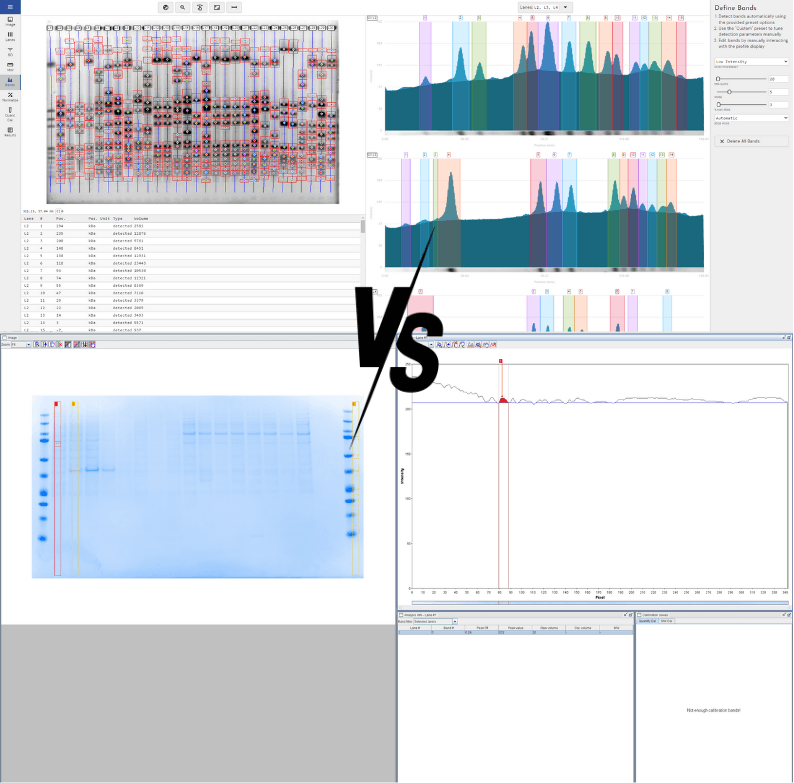
The video below runs the same western blot through GelAnalyzer and Phoretix 1D, from lane detection to calibration, export and multichannel images. It was recorded in September 2025 with an earlier GelAnalyzer release; version 26.1 has since added high-DPI scaling, which addresses the screen scaling shown at the start, and lane labels in Plus.
Run your next blot through Phoretix 1D
Open the same image you analyzed in GelAnalyzer, 16-bit if you have it, and compare the numbers in a free Phoretix 1D trial on Windows, macOS or Linux.
Frequently asked questions
Q: Is GelAnalyzer free?
A: The core program is free to download and use. Since version 26.1, some features are in a paid Plus tier: undo and redo, lane and band labels and notes, text export of the full band table and lane profiles, and single-lane image export. A Plus license costs €45 as a one-time purchase and is licensed to an individual, not an organization.
Q: What is the latest version of GelAnalyzer?
A: GelAnalyzer 26.1.1, checked on 16 October 2026. It runs on Windows, on Apple silicon Macs, on Linux as a Debian package, and as a Java package that needs JDK 26 or later.
Q: Does GelAnalyzer support 16-bit TIFF images?
A: No. Its user guide states that it currently supports only 8-bit per channel images, so a lane profile has a maximum value of 255. A 16-bit image from a chemiluminescence or fluorescence imager has 65,536 levels, so quantifying an 8-bit copy compresses the range you can measure over. Phoretix 1D reads 8-bit and 16-bit TIFF.
Q: Can GelAnalyzer normalize a western blot to a housekeeping protein?
A: Not as documented. GelAnalyzer reports each band’s volume as a percentage of all bands in its lane, but its user guide describes no normalization to a housekeeping band or a total protein stain, and it does not open multichannel images. Phoretix 1D normalizes to a reference band, a housekeeping channel or total lane volume.
Q: Is GelAnalyzer 21 CFR Part 11 compliant?
A: Its documentation describes no user accounts, audit trail or electronic signatures, so it is not set up for 21 CFR Part 11 work. Phoretix 1D with AuditSafe provides audit trails, electronic signatures, granular user permissions and image authenticity verification for 21 CFR Part 11 and EU Annex 11.
Q: How do I cite GelAnalyzer in a paper?
A: The developers say there is no published paper yet and ask you to cite the program by name, version, website and authors, for example: GelAnalyzer 26.1.1 (www.gelanalyzer.com) by Istvan Lazar Jr., PhD and Istvan Lazar Sr., PhD, CSc. To cite Phoretix 1D, use: Phoretix 1D (TotalLab Ltd, Newcastle upon Tyne, UK).
Q: Is there a free alternative to GelAnalyzer for western blots?
A: ImageJ is the other common free option, and it shares the main limitation for quantitative blots: every lane and background is set by hand, so results vary between users. Phoretix 1D has a free trial so you can test it on your own images before buying.
References
- GelAnalyzer 26.1.1 website, www.gelanalyzer.com, accessed 16 October 2026.
(Source for: version 26.1.1; developers; free core and Plus features; platforms and JDK 26 requirement; 26.1 interface redesign with high-DPI scaling; citation guidance.) - GelAnalyzer 26.1.1 User Guide, gelanalyzer.com/docs: Concepts, Start a new analysis, Background correction, Quantity Calibration, MW Calibration, Exporting results, Analysis workflow and License keys pages, accessed 16 October 2026.
(Source for: 8-bit only quotation; input formats; single-image analyses; three background methods; Rf curves; four calibration functions; MW standards; volume ratio definition; free vs Plus exports; trial key image upload.) - GelAnalyzer 26.1.1 Plus license page, gelanalyzer.com/plus, accessed 16 October 2026.
(Source for: EUR 45 one-time price; individual, not organizational, license; quotation “not an organizational license”.) - Taylor SC, Berkelman T, Yadav G, Hammond M. A defined methodology for reliable quantification of Western blot data. Mol Biotechnol. 2013;55(3):217-26. doi:10.1007/s12033-013-9672-6
(Source for: editors requesting the raw image files behind blots.) - TotalLab. Phoretix 1D product page and tutorial videos, totallab.com.
(Source for: use in pharmaceutical QC; 8-bit and 16-bit TIFF, JPEG, PNG, BMP; native Bio-Rad .scn; multichannel and multiplex images; reference band, housekeeping channel and total lane volume normalization; eight background methods; MW marker library; CSV and PDF report; protocols; AuditSafe wording.) - Taylor SC, Posch A. The design of a quantitative western blot experiment. Biomed Res Int. 2014;2014:361590. doi:10.1155/2014/361590
(Source for: journals and reviewers expecting normalized, quantitative western blot data.) - TotalLab. “GelAnalyzer Alternative | Phoretix 1D vs GelAnalyzer”, YouTube, 4 September 2025, video t_fsBQNLn_4.
(Source for: no multichannel or multipage TIFF support and no normalization options found in GelAnalyzer during the side-by-side test.)