
Upgrading from TotalLab Quant, TL120 or TL100 to Phoretix 1D

If your lab still runs TotalLab Quant, TL120, TL100, TotalLab 1D or the original CLIQS, you are in good company. Those names still appear in more published papers than any current TotalLab product, because the software kept working long after it stopped being sold. All of them have been replaced and are no longer supported by TotalLab. Phoretix 1D is the successor for gel and western blot quantification, and it opens your old TotalLab Quant, TL120 and TL100 project files. If you used TL120 for band matching, dendrograms or gel image databases, that work now belongs to CLIQS 1D Pro, a separate TotalLab product. This page shows which product replaced yours, what carries over from your old installation, how to update your SOPs and methods section, and how to upgrade.
Which TotalLab product replaced yours
TotalLab has made 1D gel analysis software for more than 20 years, and the product names changed along the way. Use the table below to find your current successor. If you used one program for both quantification and band matching, as many TL120 labs did, the work now splits between two products.
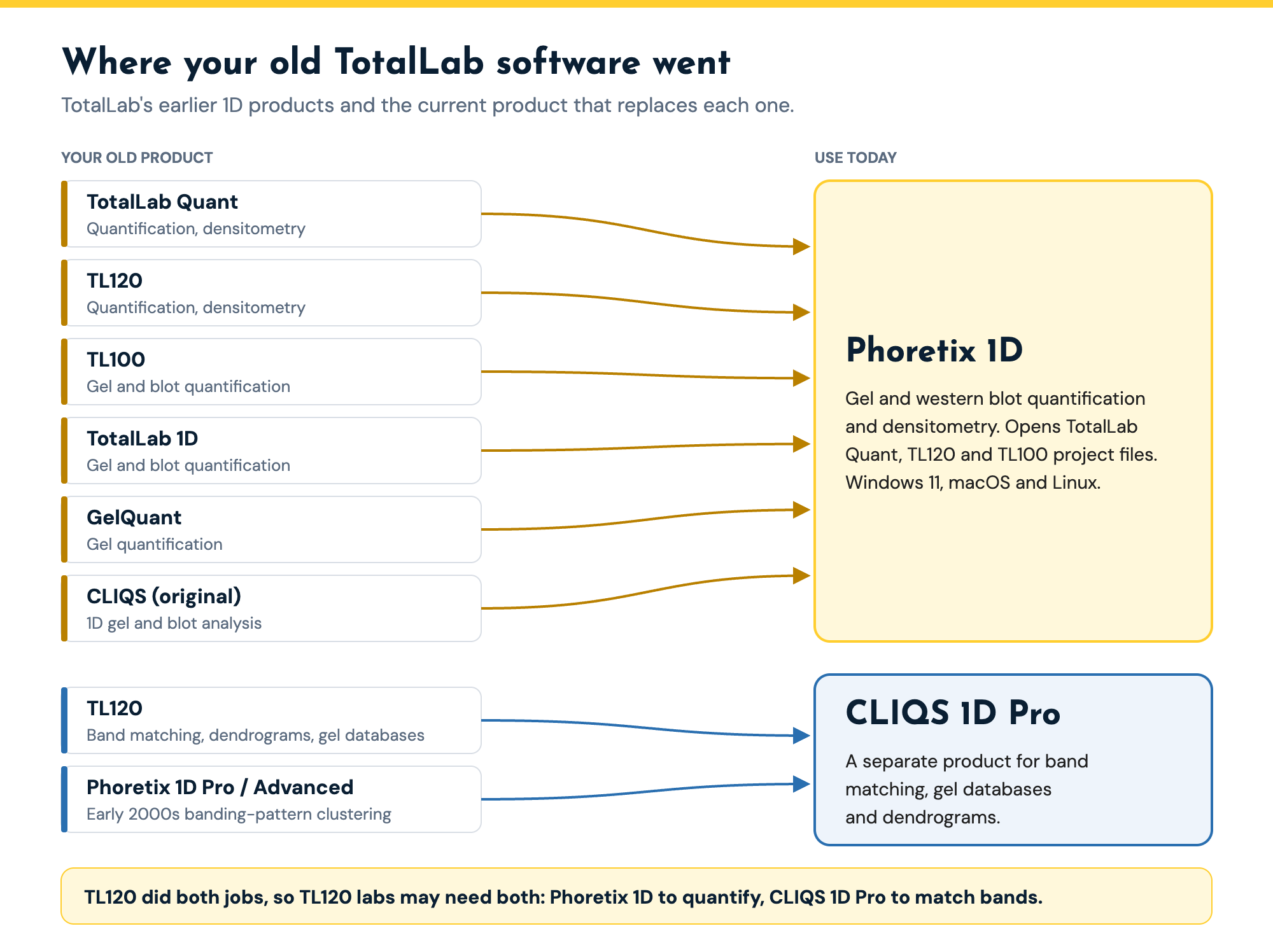
| Your old product | What you used it for | Successor today | Commonly cited versions |
|---|---|---|---|
| TotalLab Quant | Gel and western blot quantification, densitometry | Phoretix 1D | v7, v11, v12 |
| TL120 | Band quantification and densitometry | Phoretix 1D | v2006, v2008, v2009 |
| TL120 | Band matching, dendrograms, gel image databases | CLIQS 1D Pro | v2006, v2008, v2009 |
| TL100 | Gel and blot quantification | Phoretix 1D | v2006 |
| TotalLab 1D | Gel and blot quantification | Phoretix 1D | |
| GelQuant | Gel quantification | Phoretix 1D | |
| CLIQS (the original 1D analysis product) | 1D gel and blot analysis | Phoretix 1D | |
| Phoretix 1D Pro or Phoretix 1D Advanced (early 2000s) | Banding-pattern clustering, similarity and dendrograms | CLIQS 1D Pro |
TotalLab’s earlier 1D gel analysis products and their current successors. Versions listed are the ones most often cited in published papers.
What changes when you move to Phoretix 1D
Phoretix 1D does the same job your old software did, measuring background-corrected band volumes and turning them into normalized, comparable numbers. What has changed is how much of that it does for you, and where it runs.
Automatic lane and band detection. Phoretix 1D finds lanes automatically, including distorted and empty lanes, with multiple lane boxes per image and manual editing when you want it. Band detection runs with per-lane and per-channel parameters.
Eight background subtraction methods. None, rolling ball, rubber band, constant value, profile minimum, image rectangle, lane edge and manual, each set per lane and per channel. The background subtraction guide explains each one.
Normalization built in. Normalize to a reference band, the most intense band, total lane volume or a housekeeping channel, and report the ratio to control without a spreadsheet.
Modern platforms. Phoretix 1D runs on Windows 11, macOS (Intel and Apple silicon), Linux and ARM, and opens 8-bit and 16-bit TIFF, multi-page and multiplex TIFF, IMG, JPEG, PNG and BMP from any imager, plus Bio-Rad .scn files natively.
Reporting. A one-click PDF report records the settings used, alongside CSV export and copy to clipboard.
Support and updates. Phoretix 1D is actively developed, with unlimited technical support, training and free updates included in the license cost.
What carries over from your old installation
Your project files. Phoretix 1D opens project files saved by TotalLab Quant, TL120 and TL100, so years of past analyses come across with you rather than being redone from scratch.
Your images. Phoretix 1D opens the TIFF files your imager produced, whichever imager that was, and reads Bio-Rad .scn files natively, so archived gels and blots can be reanalyzed in the new software.
Your method. Densitometry is the same measurement it always was: integrated band intensity after background subtraction, normalized to a loading control. Results from the two programs measure the same quantity, so opening a few old projects alongside their original exports is the simplest way to show continuity.
Updating your SOPs and methods section
Rolling ball settings. In older TotalLab software the rolling ball radius was set in pixels. Phoretix 1D sets it as a percentage of the lane length, so the same setting gives the same result whatever the image size. If your SOP gives a radius in pixels, the free rolling ball size converter turns it into the new percentage in one step.
Your methods section. Cite the software you actually used for each experiment. For new work, name Phoretix 1D, and if your lab’s earlier papers named TL120 or TotalLab Quant, you can say so to show continuity:
Band intensities were quantified by densitometry using Phoretix 1D version [X] (TotalLab Ltd, Newcastle upon Tyne, UK), the successor to TotalLab TL120, with [rolling ball] background subtraction, and normalized to [total protein / beta-actin] in the same lane.
The densitometry guide has a full template methods sentence and the reporting checklist.
If you used TL120 for band matching, dendrograms or a gel database
TL120 also did band matching across lanes and gels, dendrograms and gel image databases. That work now belongs to CLIQS 1D Pro. It matches bands automatically across lanes and gels within a tolerance you set, corrects gel-to-gel running differences with Rf calibration, stores lanes in a database you can search against a reference library, and builds dendrograms by UPGMA with the Dice or Jaccard similarity coefficient. Labs doing RAPD, ERIC-PCR, PFGE, DGGE or RFLP fingerprinting should start with the CLIQS 1D Pro free trial rather than Phoretix 1D. The same applies if you used the older Phoretix 1D Pro or Phoretix 1D Advanced for banding-pattern clustering.
Regulated labs: replacing a legacy install under GMP
TotalLab Quant, TL120 and TL100 are no longer supported, and an unsupported program on an old workstation is hard to defend in an audit. Phoretix 1D with TotalLab’s AuditSafe module provides audit trails, electronic signatures, granular user permissions and image authenticity verification for FDA 21 CFR Part 11 and EU Annex 11, with in-person IQ/OQ packages available. Licensing is per computer with unlimited users, and it activates offline for air-gapped QC PCs.
How to upgrade
- Download the free Phoretix 1D trial (or the CLIQS 1D Pro trial if your work is band matching).
- Open three or four of your old TotalLab Quant, TL120 or TL100 project files.
- Convert your SOP’s rolling ball radius with the rolling ball converter and run the same background method.
- Compare the normalized results with the exports from your old software.
- Contact TotalLab for a quotation. Multi-license and site-wide pricing is available.
Bring your TL120 and TotalLab Quant projects to Phoretix 1D
Open your old project files in a free Phoretix 1D trial and compare the results. When you are ready, talk to us about a Phoretix 1D license.
Frequently asked questions
Q: What replaced TotalLab Quant?
A: Phoretix 1D. It does the same gel and western blot quantification, with automatic lane and band detection, eight background subtraction methods, built-in normalization and PDF reporting, and it runs on Windows 11, macOS and Linux.
Q: What replaced TL120?
A: It depends on what you used TL120 for. For band quantification and densitometry, the successor is Phoretix 1D. For band matching across lanes and gels, dendrograms and gel image databases, the successor is CLIQS 1D Pro.
Q: Is TL120 still supported?
A: No. TL120, TL100 and TotalLab Quant are no longer supported by TotalLab. Phoretix 1D and CLIQS 1D Pro are their supported successors, with unlimited technical support, training and free updates included in the license cost.
Q: Can Phoretix 1D open my TL120 or TotalLab Quant files?
A: Yes. Phoretix 1D opens project files saved by TotalLab Quant, TL120 and TL100, as well as the original images, including 8-bit and 16-bit TIFF from any imager and Bio-Rad .scn files.
Q: Will my results match my old software?
A: The measurement is the same, background-corrected band volume normalized to a loading control. Background settings are now expressed differently (the rolling ball radius is a percentage of lane length rather than pixels), so convert your old setting with the rolling ball converter and open a few old projects side by side with their original exports before switching your SOP.
Q: How do I cite Phoretix 1D?
A: Phoretix 1D (TotalLab Ltd, Newcastle upon Tyne, UK), with the version number you used. If your earlier papers named TL120 or TotalLab Quant, you can add “the successor to TotalLab TL120” to show continuity.
Q: Does Phoretix 1D run on a Mac?
A: Yes. Phoretix 1D runs on macOS (Intel and Apple silicon) as well as Windows 11, Linux and ARM.
References
- TotalLab. Phoretix 1D product page. https://totallab.com/software/1d-gel-western-blot-analysis-software/
(Source for: legacy product names; CLIQS 1D Pro as the TL120 successor for band matching; formats, platforms, detection, eight background methods, normalization modes, reporting, licensing, support, AuditSafe.) - TotalLab. CLIQS 1D Pro product page. https://totallab.com/software/1d-gel-electrophoresis-band-matching-software/
(Source for: automatic band matching, Rf calibration, database and reference library, UPGMA dendrograms with Dice or Jaccard similarity, fingerprinting methods.) - TotalLab. Phoretix 1D rolling ball size converter. https://totallab.com/phoretix1d-rolling-ball-converter/
(Source for: legacy pixel radius converted to percentage of lane length.) - TotalLab product team, October 2026 (internal).
(Source for: Phoretix 1D opens TotalLab Quant, TL120 and TL100 project files and Bio-Rad .scn files; legacy products no longer supported.) - TotalLab analysis of 2,907 papers citing TotalLab 1D software, 2001 to 2026, from the Bioz citation record, September 2026 (internal).
(Source for: TL120, TotalLab Quant and TL100 still cited; versions most often cited.)