
Western blot and SDS-PAGE images: how to capture, edit and present them
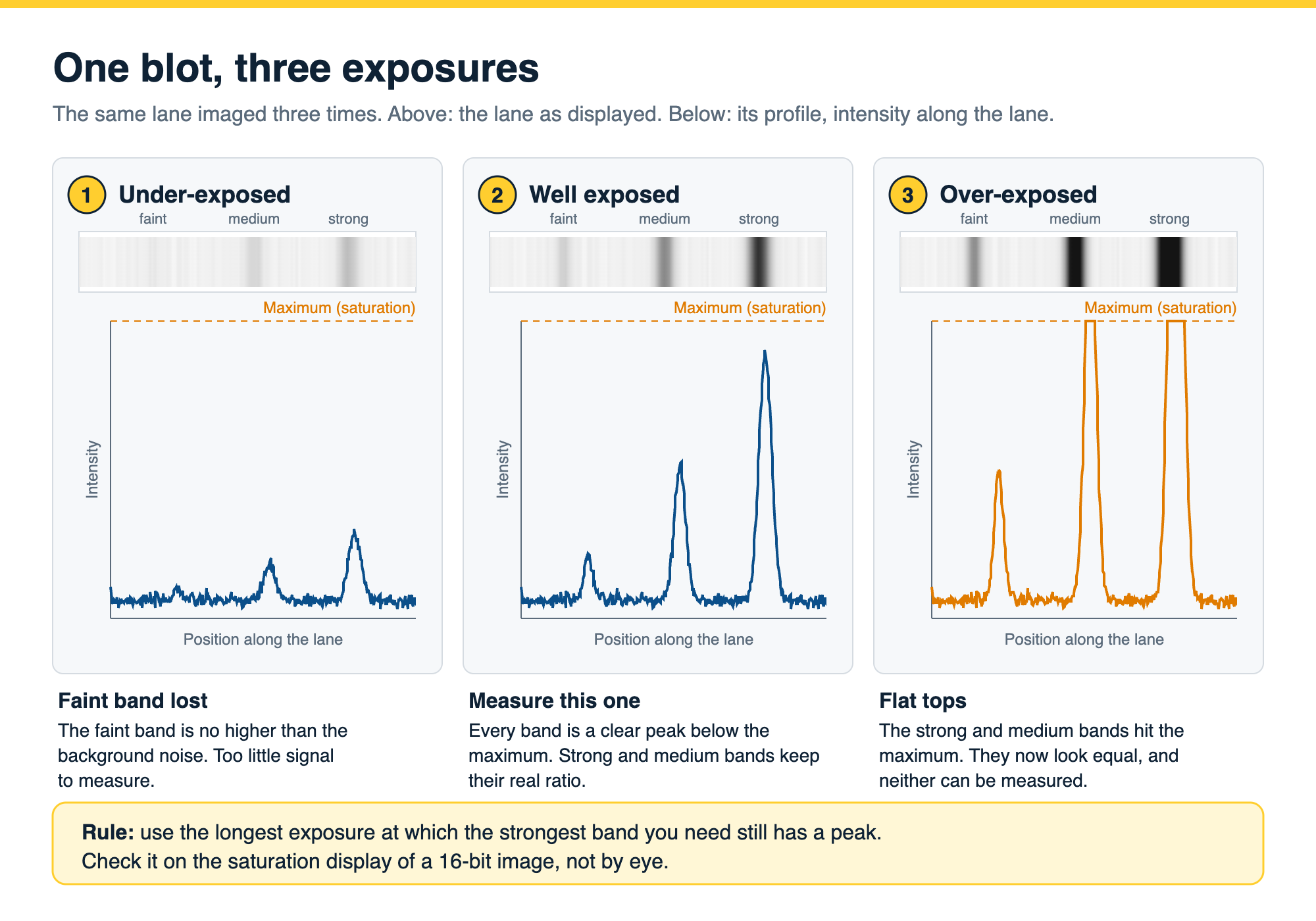
A western blot or SDS-PAGE image you can quantify and publish is a grayscale 16-bit file from a digital imager, exposed so that no band you need to measure is saturated, saved in its original format or as an uncompressed TIFF, and never edited outside the analysis software except for whole-image adjustments, cropping and 90-degree rotation. Journals then expect molecular weight markers in the figure, any spliced lanes marked, and the uncropped original image available on request or in the supplement.
This guide covers how SDS-PAGE and western blot images differ, how to capture them, which file formats keep the data, which edits are acceptable, and how to label and present the final figure.
On this page
Western blot image checklist
| Stage | Do | Avoid | Why |
|---|---|---|---|
| Capture mode | Grayscale | Color (RGB) | A 24-bit color image holds only 8 bits per channel |
| Bit depth | 16-bit, or at least 12-bit | 8-bit files and screenshots | 65,536 gray levels per pixel against 256, so faint bands and small differences are kept |
| Exposure | The longest exposure at which the strongest band you need still has a peak | Auto-exposure tuned for a nice picture | A saturated band has a flat top and cannot be compared |
| Detection | A digital imager (CCD or CMOS camera, or laser scanner) | Film for quantification | Film was linear over 16-fold against 128-fold for a CCD imager on the same blot |
| File format | The imager's original file, or an uncompressed 16-bit TIFF | JPEG, PNG screenshots, slide copies | JPEG is lossy and the lost data cannot be recovered |
| Resolution | Enough pixels for a smooth band profile; the same settings for every blot in a study | Upsampling, or changing settings between blots | Extra pixels are invented data; changed settings make blots incomparable |
| Editing | Crop, rotate by 90 degrees, flip, whole-image linear brightness and contrast | Local edits, clone or healing tools, removing background | Journals treat local edits as misrepresentation of the data |
| Presenting | Molecular weight markers or labels, marked splices, uncropped originals available | Unlabeled crops, unmarked splices, a whitened background | Readers and editors need to see size, context and the untouched image |
| Archiving | Keep raw files and capture settings for every blot | Overwriting the original with an edited copy | Editors may ask for the raw images after submission |
A checklist for western blot and SDS-PAGE images, from capture to publication. The same rules apply to Coomassie, silver and fluorescent gel images.
SDS-PAGE vs western blot: what each image shows
SDS-PAGE and western blotting are two halves of one workflow, which is why they are so often searched together. SDS-PAGE separates proteins by size in a polyacrylamide gel (ref 1). In a western blot, those separated proteins are transferred from the gel to a membrane and one target is detected with an antibody (ref 2).
The images look different because they record different things:
| Feature | SDS-PAGE gel image | Western blot image |
|---|---|---|
| What it shows | Every protein in each lane | Only the protein the antibody binds |
| Separation | By size in a polyacrylamide gel | By size in a gel, then transferred to a membrane |
| Detection | Coomassie, silver or fluorescent stain, or stain-free imaging | Antibody with chemiluminescent, fluorescent or colorimetric detection |
| Typical image | Many bands per lane on a light or dark background | One or a few bands per lane on a clean background |
| What you measure | Purity, total protein per lane, size of a purified protein | Presence, apparent size and relative amount of one target |
| Normalization | Total protein in the lane | A loading control or total protein from the same blot |
| Best for | Purity checks, loading checks, protein preparations | Detecting and comparing one protein in a complex sample |
What an SDS-PAGE gel image and a western blot image show, how each is detected, and what each is used for.
An SDS-PAGE image shows every protein in each lane, so it is the image you use to check purity, loading and the size of a protein you have purified. A western blot image shows only what the antibody binds, so it is the image you use to detect one protein in a complex sample and compare its amount between samples. Many labs image both: a total protein stain of the gel or membrane, and the antibody signal from the same blot, and use the first to normalize the second.
How to read a western blot covers what each band on the blot is telling you.
Capturing the image
Blots and gels are imaged with a cooled CCD or CMOS camera system, a laser scanner or, for visible stains, a flatbed scanner. Whatever the instrument, five settings decide whether the image can be quantified. For the full method, including finding the linear range with a serial dilution and choosing an exposure, see how to capture quantitative western blot and gel images.
Grayscale, not color. A 24-bit color image holds 8 bits per channel, so it carries no more gray levels than an 8-bit grayscale image. Capture in grayscale and let the imager use its full bit depth.
Bit depth. An 8-bit image records 256 gray levels per pixel, a 12-bit image 4,096 and a 16-bit image 65,536. On screen they look the same, because a monitor shows about 256 shades, but software measures the levels, not what you see. A faint band that rises hundreds of levels above background in a 16-bit file may rise only a few levels in an 8-bit copy. Save and analyze at 16 bits.
Exposure and saturation. A pixel is saturated when the signal reaches the highest value the image can store. A saturated band has a flat top: the imager cannot record how much brighter it really was, so any comparison with that band is wrong. Choose the longest exposure at which the strongest band you need to measure still has a peak, and check that with the imager’s saturation display rather than by eye. An auto-exposure setting may be tuned to give a good-looking picture rather than to stay below saturation, so check it.
Film or digital imager. Film can be very sensitive, but its linear range is narrow. In one study of the same chemiluminescent blot, film was linear over a 16-fold range of protein, against 128-fold for a CCD imager, and film’s background also saturated, which made background-subtracted values fall at high loads (ref 3). If you still use film, scan it on a transmission scanner at 16 bits and treat the numbers with caution; for new work, a digital imager is the better choice for quantification (ref 3).
Resolution and consistency. Use enough pixels to give every band a smooth profile; on a mini gel that usually means a higher scan resolution than on a large-format gel. More important than any single number is consistency: image every blot in a study with the same instrument, resolution, bit depth and exposure strategy, and record the settings.
File formats
Keep the original. The file your imager saves (often a proprietary format, or a 16-bit TIFF) is your raw data. Keep it unchanged, alongside the instrument settings.
Analyze an uncompressed TIFF. If your analysis software cannot read the imager’s own format, export a 16-bit uncompressed TIFF and analyze that.
Do not analyze a JPEG, PNG screenshot or PowerPoint copy. JPEG compression is lossy: it averages neighboring pixels to save space, and the information it discards cannot be recovered by converting back to TIFF. Screenshots are 8-bit at screen resolution. Both are fine for showing a figure on a slide and wrong for measuring one.
Mind the conversion. Some image viewers and editors convert a 16-bit image to 8 bits when they open or save it. Check the bit depth of the file you are about to analyze.
Editing: what is allowed
Journal guidelines on image editing come down to one test: is the edited image still an accurate representation of the original data (ref 5)? In practice, editors agree on the following.
Acceptable, applied to the whole image:
- cropping,
- rotating by 90 degrees and flipping,
- linear brightness and contrast adjustments, applied equally to the whole image and to its controls, as long as no information is lost (refs 5, 6).
Acceptable only with disclosure in the figure legend: nonlinear adjustments such as gamma, curves or levels (ref 5).
Not acceptable:
- adjusting one band or one region of the blot,
- removing a band, a speck or background with clone, healing, patch or eraser tools, or with generative fill (refs 5, 6),
- raising contrast until the background disappears, because faint bands disappear with it (refs 5, 6),
- moving or duplicating a band, a lane or a panel,
- joining lanes without marking the join, or placing lanes from different gels side by side as if they were one (refs 5, 6),
- increasing the number of pixels beyond the original, which creates data that was never captured (ref 5).
Problem images are not rare. In a screen of 20,621 papers from 40 journals, 3.8% contained inappropriately duplicated images, at least half of them suggestive of deliberate manipulation (ref 7). Editors now screen for this, so keep every edit to the whole image and do all of it in software that leaves the raw file untouched.
Quantify the raw image, never the edited figure. Contrast changes alter the pixel values that densitometry measures.
Labeling and presenting a western blot figure
A study of 551 papers in leading neuroscience and cell biology journals found that more than 90% showed only cropped blots, more than 80% did not provide uncropped source images, more than 95% had no visible molecular weight marker bands, and around one-third had no molecular weight labels at all (ref 8). The same study recommends:
- labeling at least two marker bands of different weights when the target falls between them, or three when it sits on a marker band, with labels above and below the target,
- if you crop, leaving several band-widths above and below the target, and showing at least one full-length blot,
- marking every splice with a line and saying in the legend which lanes were removed,
- sharing uncropped images of every blot, with the cropped region outlined and labeled by figure and panel,
- keeping a gray background rather than whitening it, so the reader can see the image has not been over-adjusted,
- showing quantification as dot plots rather than bar graphs, so the replicates are visible (ref 8).
Label the lanes with the sample names, the antibody or stain on each panel, and the loading control. Say in the legend how the image was captured and how it was quantified, and report the protein loaded per lane.
Journal image requirements
Requirements differ in detail, but the major publishers ask for the same things. Nature Portfolio, for example, asks authors to provide the original uncropped data for every gel and blot in the final figures, ordered as they appear in the figure; to mark vertical splices with a line or gap; to apply contrast changes to the whole image and equally to the controls; and not to use touch-up or generative tools on gel images (ref 6). Some journals also ask for the imaging software and settings in the methods or legend, and editors may ask for the raw files after submission (refs 3, 4, 5).
Before you submit:
- keep the raw image files and the capture settings for every blot,
- prepare uncropped images with the displayed region outlined,
- check that every panel shows molecular weight markers or labels,
- check that every splice is marked,
- check the journal’s own figure guidelines for resolution and file type.
From image to figure in Phoretix 1D
Phoretix 1D is TotalLab’s software for SDS-PAGE and western blot analysis. It keeps the analysis and the figure in one place, working from the raw image:
- Opens the image your imager saves. Phoretix 1D reads 8-bit, 16-bit and higher uncompressed TIFF, including multi-page and multichannel TIFF, as well as IMG, JPEG, PNG and BMP, from any imager (ref 9).
- Shows saturation. Saturated areas are highlighted in orange on the image, so you can see which bands cannot be measured before you measure them (ref 10).
- Edits without breaking the data. Crop, flip, rotate and adjust contrast inside the software while the TIFF metadata (calibration, pixel density, scanner settings) is kept (ref 9).
- Exports the figure directly. Export a presentation image at up to 2400 dpi, cropped, with or without lane labels, overlays, annotations, an intensity scale and a distance scale (ref 10).
- Exports single lanes. Choose which lanes to include, show them vertically or horizontally, and export them at the resolution the journal asks for (ref 11). If you leave out lanes that sat between the ones you show, mark the join in the final figure.
- Documents the analysis. Export the molecular weight calibration curve, quantity calibration curves and lane profiles, or a PDF report with all of them (refs 9, 10).
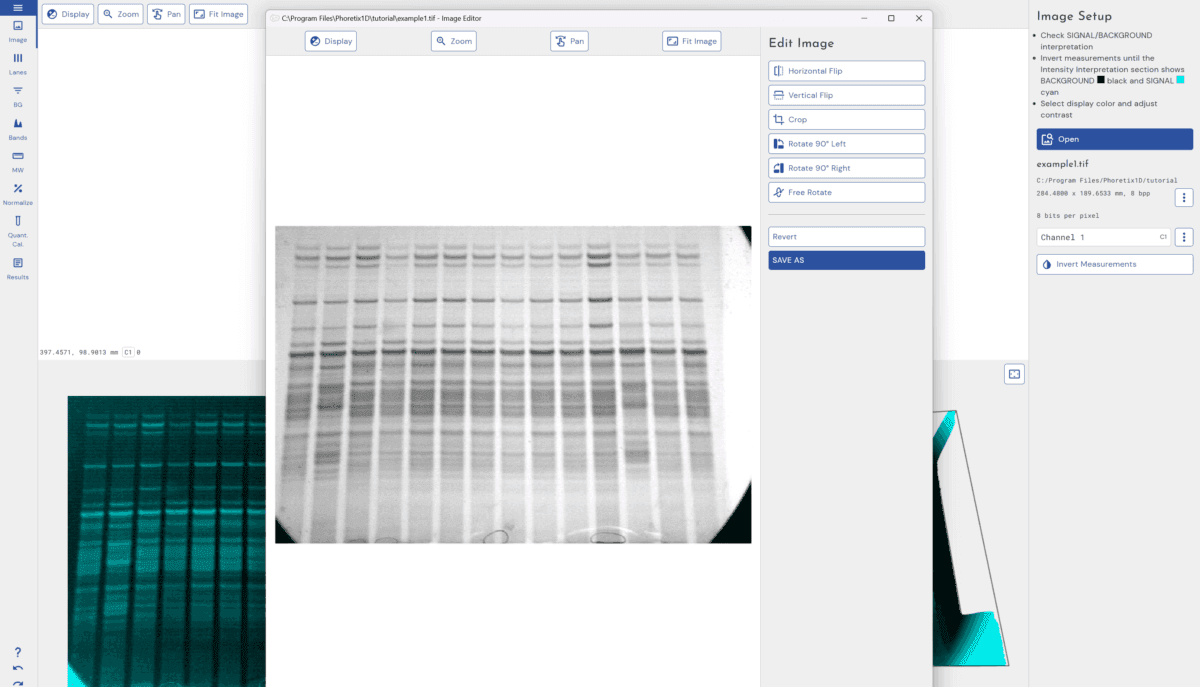
Phoretix 1D runs on Windows, macOS and Linux (ref 9). In regulated labs, AuditSafe adds audit trails, electronic signatures, user permissions and image authenticity checks for 21 CFR Part 11 and EU Annex 11 (ref 9).
If you quantified with Phoretix 1D, the methods sentence reads: “Band intensities were quantified by densitometry using Phoretix 1D (TotalLab Ltd, Newcastle upon Tyne, UK).” Add the background subtraction method and the loading control you normalized to.
For how band intensity is measured from the image, see the western blot densitometry guide. For 2D gels, see imaging 2D gels.
The video below takes a western blot from analysis to figure in Phoretix 1D: the saturation overlay, a cropped export at up to 2400 dpi with scale bars and labels, and the calibration curves and PDF report that document the analysis.

Take your next blot from raw image to figure
Open one of your own 16-bit images in a free Phoretix 1D trial: check it for saturation, quantify the bands and export the figure without a trip through Photoshop.
Frequently asked questions
Q: What is the difference between SDS-PAGE and a western blot?
A: SDS-PAGE separates the proteins in a sample by size in a gel, and a stain shows all of them. A western blot transfers those separated proteins to a membrane and detects one target with an antibody. SDS-PAGE is used to check purity, loading and size; a western blot is used to detect and compare one protein in a complex sample.
Q: What bit depth should a western blot image be?
A: 16-bit, or at least 12-bit. A 16-bit image records 65,536 gray levels per pixel against 256 for an 8-bit image, so faint bands and small differences between bands are kept. Analyze the 16-bit file, not an 8-bit copy or a screenshot.
Q: Can I use a JPEG image for western blot quantification?
A: No. JPEG compression is lossy and changes the pixel values that densitometry measures, and converting the JPEG back to TIFF does not restore them. Quantify the original file or an uncompressed 16-bit TIFF, and keep JPEGs for slides.
Q: Is it acceptable to adjust brightness and contrast on a western blot image?
A: Yes, if the adjustment is linear, applied to the whole image and equally to the controls, and does not remove information such as faint bands or the background. Nonlinear adjustments such as gamma or curves must be stated in the figure legend. Adjusting a single band or region is not acceptable.
Q: Can I crop a western blot image?
A: Yes, but leave space above and below the target, keep molecular weight markers or labels in the figure, and provide the uncropped original. Many journals require the uncropped images as source data or supplementary files.
Q: How do I label a western blot figure?
A: Label the lanes with the samples, each panel with the antibody or stain, and the molecular weight markers on the side, ideally with at least two marker bands of different weights around the target. Mark any spliced lanes with a line, and describe the capture and quantification in the legend.
Q: Is film or a digital imager better for western blots?
A: For quantification, a digital imager. Film is sensitive but has a narrow linear range and saturates easily; in one comparison of the same blot, film was linear over a 16-fold range of protein against 128-fold for a CCD imager.
References
- Laemmli UK. Cleavage of structural proteins during the assembly of the head of bacteriophage T4. Nature. 1970;227(5259):680-5. doi:10.1038/227680a0
(Source for: SDS-PAGE separates proteins by size.) - Towbin H, Staehelin T, Gordon J. Electrophoretic transfer of proteins from polyacrylamide gels to nitrocellulose sheets: procedure and some applications. Proc Natl Acad Sci U S A. 1979;76(9):4350-4. doi:10.1073/pnas.76.9.4350
(Source for: transfer of separated proteins to a membrane and antibody detection.) - Taylor SC, Berkelman T, Yadav G, Hammond M. A defined methodology for reliable quantification of Western blot data. Mol Biotechnol. 2013;55(3):217-26. doi:10.1007/s12033-013-9672-6
(Source for: film linear over a 16-fold range against 128-fold for a CCD imager on the same blot; film background saturation lowering background-subtracted values; camera systems determining the saturation point; editors requesting raw data files.) - Gassmann M, Grenacher B, Rohde B, Vogel J. Quantifying Western blots: pitfalls of densitometry. Electrophoresis. 2009;30(11):1845-55. doi:10.1002/elps.200800720
(Source for: none of 100 papers documented how blot images were turned into numbers; the need to state how images were captured and quantified.) - Rossner M, Yamada KM. What’s in a picture? The temptation of image manipulation. J Cell Biol. 2004;166(1):11-5. doi:10.1083/jcb.200406019
(Source for: the accurate-representation test; whole-image linear adjustments acceptable; nonlinear adjustments disclosed; no local band adjustments, clone tools or background removal; splices marked; no combining lanes from different gels; no increase in pixel number; keep original data and settings.) - Nature Portfolio. Research figure guide: image integrity. https://research-figure-guide.nature.com/figures/image-integrity/
(Source for: original uncropped data for all gels; splices marked; contrast applied to the whole image and equally to controls; no contrast increase that loses background; no touch-up or generative tools.) - Bik EM, Casadevall A, Fang FC. The prevalence of inappropriate image duplication in biomedical research publications. mBio. 2016;7(3):e00809-16. doi:10.1128/mBio.00809-16
(Source for: 3.8% of 20,621 papers from 40 journals with problematic figures, at least half suggestive of deliberate manipulation.) - Kroon C, Breuer L, Jones L, et al. Blind spots on western blots: assessment of common problems in western blot figures and methods reporting with recommendations to improve them. PLoS Biol. 2022;20(9):e3001783. doi:10.1371/journal.pbio.3001783
(Source for: 551 papers; more than 90% only cropped blots; more than 80% without source data; more than 95% without visible marker bands; around one-third without molecular weight labels; recommendations on marker labels, crop margins, full-length blots, splices, source data, gray background and dot plots.) - TotalLab. Phoretix 1D product page. https://totallab.com/software/1d-gel-western-blot-analysis-software/
(Source for: file formats and bit depths; multi-page and multichannel TIFF; editing with TIFF metadata kept; calibration curve and PDF report export; operating systems; AuditSafe features.) - TotalLab. “Publication-Quality SDS-PAGE & Western Blot Figures: Direct Export from Phoretix 1D”, YouTube, 11 March 2026, video EBIBoFdYcX4.
(Source for: saturation shown in orange; export presentation image up to 2400 dpi; crop before export; overlays, annotations and scales; calibration curve and lane profile export; PDF report.) - TotalLab. “Export Single Western Blot Lanes, Publication Quality”, YouTube, 11 June 2026, video GN1bi2ItVoQ.
(Source for: single-lane export in Phoretix 1D version 1.4, lane labels and scales, vertical or horizontal lanes, output resolution.)